Saturday, March 13, 2021

What is 'Infrastructure As Code (IaC)'?


You peel the cellophane wrap from your factor-new computer and prepare to go through the manual checklist of setting it all up.  Libraries, frameworks, tools and applications....one by one you check them off, grabbing a coffee or taking a long lunch as the time for each step dictates.  The morning turns to afternoon, the afternoon to evening, the day wasted away but really, what choice do you have?

The alternative choice originated back in 2005, an experienced system administrator Luke Kanies recognized the value of automating the setup and maintenance of data centers.  Lacking applicable tools, he elected to create one.  That was the origin of Puppet.

But this post isn't about Puppet, nor Chef, Docker or Kubernettes but they all originate from the same concept; automate the process of setting up and maintaining systems.  The goal; a big 'easy button', a new system? Hit the easy button.  New security patches required for a dozen back-end servers?  Hit the easy button.  A new developer joining the group needing a host of IDEs, utilities and tools...hit the button.


Almost 60 years?  The first computer was available in 1946, the first concept of setup/maintenance automation in 2005, why on did it take so long for such tooling to exist?  The year, 2020 and only a fraction of computers are maintained using automation...why isn't everyone using it?

Whelp, it's all about time; time and control.  I suppose there are a number of reasons folks don't capitalize on IaC, some likely feel it is a fad, some likely feel more comfortable maintaining a system manually (maintaining explicit control), some perhaps need or require non-uniform configurations, perhaps applying updates/patches to particular machines before applying to the masses.  There is merit to all these considerations but in my opinion it's mostly about time.  Focusing exclusively on productivity, setting aside any wouldn't it be cool it" motivations, its the constant trade between "how long to automate" vs "how long to just do it".   Authoring system configurations takes effort, requires testing, requires considerations of each step failure,....never free, always a trade.  If you provision a dozen systems a month, or maintain hundreds the effort of automation likely would pay huge dividends.  A few family computers, updated bi-yearly, each individualized....likely more time than it's worth.

IaC Architecture

At it's core, IaC technologies all tend to follow the same overall architecture.  The following diagram applies to Puppet, but is comparable to other IaC technologies.
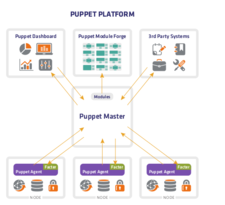
Overall, the system contains the systems to be maintained, a series of user desktop systems or laptops, or the host of VMs or infrastructure servers.  These 'maintained systems' run an agent, the agent communicates with a master service, the thing that keeps track of what stuff should be running where.  The master maintains the installation media, tarballs, security patches....the files a maintainer would use if they were to update the systems manually.  Additionally, the master service would have a list of what servers require which applications/libraries/patches.  When a new configuration is required, it's updated on the master.

The maintained systems will occassionally 'call home', communicate back to the master to see if their are updates that are required.  If so, the agent transfers the files from the master and executes the update.  In the case of Puppet, the agents (by default) call back to the master every 30 minutes.

In the absence of an actual person running the updates, observing the process, an IaC requires some means to confirm everything when smoothly.  Often, some form of a dashboard, a way to see if any systems failed in the process.

The agent/master file transfer, execution and status constitutes the 'easy button'.  The real heavy-lifting is authoring, organizing, maintaining and testing the configurations leading up to hitting he button.  Like any automation task, trial and error and testing can be a considerable effort and you'd better have your ducks in a row before you push it out to dozens of machines!  The only thing worse than having to manually update 50 servers is to have to manually undo problematic updates...will absolutely ruin your evening plans, your weekend and your rep.  Great power, great responsibility and Uncle Ben once said.

Whether you have an immediate need, or a mild curiousity, it's certainly worth peeking at IaC.  Some of the major open-source players are:

The concept of containers also fall into this category:

As the world continues to transform into a 'computing on demand' model, VMs created and destroyed as needed, elastic systems dynamically launching containers as needed our need for devops demands a means to respond.  

What is CI/CD?

https://www.nytimes.com/2018/01/31/sports/football/quarterback-signals-hut.html

Imagine American football without 'an audible'; you huddle up, you make a decision on the play and you fully commit to executing that play 100% regardless of the new evidence as it presents itself.  It's very likely, regardless of the teams leadership or the talent of the team, you'll end up losing to an equally talented team that is willing to change course on the play if the situation demands it.  That, in part what continuous integration and continuous delivery is meant to address.

Traditionally, software development teams would collaborate with other departments to establish a plan (i.e. features/bugs/refactoring efforts for the next product release), vanish from site to focus on the design and development tasks in isolation only to rejoin the society after completing the development efforts to deliver a new build for testing and feedback.  A team may have a dozen or so activities, many self-contained and independent from one another, but the traditional model would tend not facilitate an internal build for feedback or testing until all development activities had concluded.  This results in an artificial bottleneck by holding up the possibility of testing and feedback efforts until much later than necessary.  

Continuous integration (CI) and continuous delivery/deployment (CD) are intended to remedy that by investing effort in creating an environment that creates autonomously creates builds during the development process that can be utilized by external stakeholders (e.g. testers and other internal customers).  This is often referred to as the CICD pipeline.


Continous Integration

Continuous integration has the goal of automating the process of building and performing automated tests on the latest changes to the code base.  When a developer completes an activity they commit the changes to the code repository, the build system recognizes that a change has been made available and creates a build.  A successful build means little more than 'it compiled' so to gain confidence in the change the build is made available to a testing system which performs a series of automated tests on the build.  If the tests pass, you have a newly available build with a level of confidence in it.

@todo graphic: developers x N => code repository => build system => test framework

Continous Delivery/Deployment (CD)

The CD stands for two independent concepts: continuous delivery and continuous deployment, separate concepts but related by nature.  Typically, continuous delivery is often supported, continuous deployment is considered optional in many circles.

Continuous Delivery

Continuous delivery involves simply making new builds available for use.  Simply copying a successful build, preferably one that passed the automated tests, to a shared location where stakeholders can access them and you've essentially satisfied continuous delivery.  The builds may be acted on, or ignored, the automation means it didn't cost any manual developer time so no resentment in not acting on any particular build.

Continuous Deployment

Continuous deployment takes this step a bit farther by automatically deploying the new build to target systems.  For instance, perhaps you have a sophisticated automated test system that is capable of conducting performance testing.  A new build becomes available, the test system updates to the latest build and executes performance testing on the new build to ensure there is no regression in performance.  This concept could go as far as performing continuous deployment to production servers, although the thought of such a system gives me a shiver.

That's pretty much it, in a nutshell.  

Colorizing Text with Python


Let me tell you a story, a story of struggles and challenges, a drab colorless life until one day a gleaming figure steps out of the mist and introduces me to the rainbow of colors that are......

Actually, it's just a short post of how to add a little color to your Python console output.

Let's start with a class definition, one that defines the escape key sequences necessary for adding color to simple text.  The general format is encapsulating the text within a start and end key sequence.  The string starts with a header, followed by the color sequence, then the actual string, followed by a trailer sequence that indicates we're done with the key sequence.


$ cat -n Color.py
     1    #!/usr/bin/python
     2   
     3    class Color:
     4      Header='\033[95m';
     5      Trailer='\033[0m';
     6      Default      = '\033[39m';
     7      Black        = '\033[30m';
     8      Red          = '\033[31m';
     9      Green        = '\033[32m';
    10      Yellow       = '\033[33m';
    11      Blue         = '\033[34m';
    12      Magenta      = '\033[35m';
    13      Cyan         = '\033[36m';
    14      LightGray    = '\033[37m';
    15      DarkGray     = '\033[90m';
    16      LightRed     = '\033[91m';
    17      LightGreen   = '\033[92m';
    18      LightYellow  = '\033[93m';
    19      LightBlue    = '\033[94m';
    20      LightMagenta = '\033[95m';
    21      LightCyan    = '\033[96m';
    22      White        = '\033[97m';
    23   
    24      Bold='\033[1m';
    25      Underline='\033[4mm';
    26   
    27      @staticmethod
    28      def colorize(val,color):
    29        colorVal=eval('Color.%s'%(color));
    30        retVal="%s%s%s%s"%(Color.Header,colorVal,val,Color.Trailer);
    31        return retVal;


The 'colorize' method takes in a string and a color, returns a string sequence. As an alternative, you can use the key sequences explicitly.  This short example demonstrates both possibilities.

 $ cat -n foo
     1    #!/usr/bin/python
     2    #-- https://godoc.org/github.com/whitedevops/colors
     3    
     4    from Color import Color;
     5    
     6    print "Using explicit control characters";
     7    print " " + Color.Header + Color.Red + "Red" + Color.Trailer;
     8    print " " + Color.Header + Color.Green + "Green" + Color.Trailer;
     9    print " " + Color.Header + Color.Blue + "Blue" + Color.Trailer;
    10    
    11    for color in ['Black', 'Red', 'Green', 'Yellow' , 'Blue', 'Magenta', 'Cyan', 'LightGray', 'DarkGray', 'LightRed', 'LightGreen', 'LightYellow', 'LightBlue', 'LightMagenta', 'LightCyan', 'White']:
    12      print " > %s"%(Color.colorize(color,color));
    13    


Now, go slap some color in your boring old programs!


Monday, November 2, 2020

FFmpeg Commands -- Blog Content Summary

Over the past couple years this blog contains a variety of content that interests me.  While not intended, a considerable amount of this blog revolves around using FFmpeg.  I feel drawn to this particular utility for a number of reasons I guess:

  • it is primarily a command-line interface; offering a great deal of flexibility
  • while powerful and popular, I find it lacks sufficient examples and documentation in demonstrating its use, a significant learning curve for the new user
  • I have a history of interest in image processing and computer vision which aligns with, or compliments, these interests
  • I have an interest in polishing and refining personal media content and this tool hits all the buttons to do so
I thought I'd touch on some of the areas of content, specifically to see what areas I've covered and plan areas that may be worth focusing on.  I have a starting-point for a more comprehensive tutorial on FFmpeg that I am preparing for a future presentation, perhaps YouTube or a Meet-Up.  Stay tuned.

Setup/Configuration/Installation

My daily drivers tend to be Linux-based workstations and laptops, so my setup/configuration instructions tend to follow:

Convert Images to Video

Nearly everyone on planet Earth now carries around a high-definition camera in their pocket.  We snap hundreds, if not thousands, of photos over the course of the year.  It's pretty common to want to take a series of images and transform it into a slide-show to amazing and impress your friends and family.  Here are but a few resources to do just that.

Clipping Time Segments from Video

First order video processing is trimming out uninteresting time segments.  Take a raw video, clip out interesting bits and concatenate them together will set you on course for a better video presentation.

Concatenating Videos

Cropping Video

Whether its clipping out a noisy background or simply directing the viewers attention, often you want to crop out the point-of-interest from a wide-angle shot.

Padding/Extending Video

Sometimes, just the opposite is needed, taking a video of arbitrary size and making it bigger to accommodate an additional visual (e.g. overlay, video, graph,...)

Zooming In/Out of Video

A static shot can still draw the viewers attention by zooming in/out to draw the viewers focus to a narrower or broader aspect.

Applying Overlay to Video

Like frosting on a cake, adding overlays upon a video makes a good product even better (image, text or subvideo).

Fading In/Out of Video

We've all seen it, a scene transition from one location or another, typically demonstrated by fading out of the first scene (e.g. fade-to-black) and fading into the next (e.g fade-from-black).

Video Blending

Sometimes we wish the resultant video to be comprised of multiple semi-transparent sources, sometimes referred to as cross-fading.  Dynamically applying a weighting factor from multiple sources can give you some pretty dramatic effects.

Video Scene Transitions

I've authored a series of posts which provide a variety of scene transitions, introducing a new cut scene by moving in the destination scene in some manner (e.g. wipes, curtain-call,...)

Video Blurring

Whether it be a license plate, a disruptive background, or subjects who rather not be in your video, there is often a need for applying a blur to a video or video areas.

Video Stablilization

Shaky hand?  No tripod?  This video filter can remove the side-effects of a shaky videographer.

Creating Cartoon from Video

Can you take a real video and convert it into something more cartoon-like?  We spent some time doing just that.
ZeroMq (e.g. 0mq, zmq) is integrated into FFmpeg and can be used to dynamically modify video filters on the fly.
I particularly find that make and video processing make a good pairing, especially when the video processing utility is command-line based.  These two utilities play very well together.

Tuesday, October 13, 2020

Google ProtoBuff + ZeroMq -- C++


In the last series of posts we demonstrated ZeroMq as a technology that supports 'sockets on steroids', supporting multiple platforms as well as multiple languages.  The examples to-date have been transmitting strings between senders and receivers.  While interesting, to effectively create a distributed heterogeneous system we need to be capable of transmitting meaningful messages, preferably complex data structures rather than just strings.  That's where Google's Protobuff comes into play: http://code.google.com/p/protobuf/


Building off our previously created Ubuntu 12.04 32-bit VM, let's start by installing the additional necessary packages;


$ sudo apt-get install libprotoc-dev


With the developer libraries installed, we can now extend our previous C++ example to transmit a ProtoBuff message.


We'll extend our Makefile to add the necessary libraries and a target (e.g. msgs) to generate the C++ files for the message.


$ cat Makefile 

CC=g++

SRCS=main.cpp Messages.pb.cc

OBJS=$(subst .cpp,.o,$(SRCS))

INCLUDES += -I.

LIBS += -lpthread -lrt -lzmq -lprotobuf

.cpp.o:

$(CC) -c $<

main: msgs ${OBJS} 

${CC} ${CFLAGS} -o $@ ${OBJS} ${LIBS}

msgs:

${SH} protoc -I. --cpp_out=. Messages.proto

clean:

${RM} ${OBJS} main *.pb.*


Oh, we should take a look at our simple Protobuff message file:


$ cat Messages.proto 

message Person {

  required int32 id=1;

  required string name=2;

}


Finally, our extended main file:


$ cat main.cpp 

#include

#include

#include

#include

#include

#include

#include "Messages.pb.h"

void* ctx=zmq_init(1);

char* EndPoint="tcp://127.0.0.1:8000";

static const int N=100;

static const int BufferSize=128;

void* sender(void*)

{

  printf("(%s:%d) running\n",__FILE__,__LINE__);

  void* pub=zmq_socket(ctx, ZMQ_PUB);

  assert(pub);

  int rc=zmq_bind(pub,EndPoint);

  assert(rc==0);

  Person p;

  p.set_name("fatslowkid");

  p.set_id(01);

  for(int i=0; i

  {

    zmq_msg_t msg;

    std::string S=p.SerializeAsString();

    char* content=(char*)S.c_str();

    int rc=zmq_msg_init_size(&msg, BufferSize);

    assert(rc==0);

    rc=zmq_msg_init_data(&msg, content, strlen(content), 0,0);

    assert(rc==0);

    rc=zmq_send(pub, &msg, 0);

    assert(rc==0);

    ::usleep(100000);

  }

}

void* receiver(void*)

{

  printf("(%s:%d) running\n",__FILE__,__LINE__);

  void* sub=zmq_socket(ctx, ZMQ_SUB);

  assert(sub);

  int rc=zmq_connect(sub,EndPoint);

  assert(rc==0);

  char* filter="";

  rc=zmq_setsockopt(sub, ZMQ_SUBSCRIBE, filter, strlen(filter));

  assert(rc==0);

  for(int i=0; i

  {

    zmq_msg_t msg;

    zmq_msg_init_size(&msg, BufferSize);

    const int rc=zmq_recv (sub, &msg, 0);

    char* content=(char*)zmq_msg_data(&msg);

    Person p;

    p.ParseFromString(content);

    printf("(%s:%d) received: '%s'\n",__FILE__,__LINE__,p.name().c_str());

    zmq_msg_close(&msg);

  }

}

int main(int argc, char* argv[])

{

  printf("(%s:%d) main process initializing\n",__FILE__,__LINE__);

  int major, minor, patch;

  zmq_version (&major, &minor, &patch);

  printf("(%s:%d) zmq version: %d.%d.%d\n",__FILE__,__LINE__,major,minor,patch);

  pthread_t rId;

  pthread_create(&rId, 0, receiver, 0);

  pthread_t sId;

  pthread_create(&sId, 0, sender, 0);

  pthread_join(rId,0);

  pthread_join(sId,0);

  printf("(%s:%d) main process terminating\n",__FILE__,__LINE__);

}


Notice that we now transmit and receive Protobuf messages, serialized as strings.  The value of this is that the serialization mechanism is multi-platform & multi-language support.


Cheers.

Tuesday, October 6, 2020

Intro to Docker


Containers are extraordinarily popular and open the doors to alternative service-oriented architectures.  This week I spent a few minutes with Docker, a quick intro to the technology.  I started with a quick intro from YouTube;

Following along, we first need to install Docker on our Ubuntu machine.

$ sudo apt-get install docker.io

After Docker is installed on our workstation we configure the container, build it, then run it. 

Our example will be trivial, a http server with a static welcome message.  The Dockerfile specifies the configuration of the container, the src/index.php serves up the welcome page.

~/docker$ tree .
.
├── Dockerfile
└── src
    └── index.php


~/docker$ cat -n Dockerfile
     1    FROM php:7.0-apache
     2    COPY src/ /var/www/html/
     3    EXPOSE 80

The Dockerfile specifies the container recipe, an Apache container, a couple configuration steps: 1) copying the index file to the container location, and 2) opening port 80 for incoming traffic.

~/docker$ cat -n src/index.php
     1    <?php
     2   
     3    echo "Hello, World";
     4    ?>


With the configuration information available, we build the container by issuing the following command:

~/docker$ sudo docker build -t hello-world .

Afterwards, we can launch the container:

~/docker$ sudo docker run -p 8080:80 hello-world

The port redirection redirects 8080 incoming ports to the host to the container port 80.

Then, we can connect to the container by opening a browser to connect to our host: http://localhost:8080

Enjoy!

Sunday, September 27, 2020

Will The WFH Trend Result In An Increase In Outsourcing?

Photo by Oleg Magni from Pexels

In general, I desperately try to see the good in things; every cloud has a silver lining style stuff. Typically, if you look hard enough you can find good in most things, but you tend to have to dedicate a real effort to find it.
This dumpster fire of a year has required a herculean effort from the world to find the good in a historically crappy year. Remember when 46 million acres of Australia burned to ash and we were all thinking that would be the disaster of the year? Devastating yes, but not nearly the 'disaster of the year nominee' we may have thought at the time. Fast forward to the world's pandemic, a worldwide unemployment rate of 8.3%, businesses encountering challenges of a lifetime, young and old affected and the mental health of the world just teetering on the razors edge between partial insanity and full-blown mental breakdown. Finding good, any modest level of good, is like an epic game of Where's Waldo.

In search of good some, I'd even argue many, have found a glimmer of a positive in the form of a world-wide 'working from home (WFH)' policy change. Personally, I have found solace in the fact that I enjoy the WFH environment much more than I had expected. I was always a 'go into the office guy', preferring the separation, and as a life-long participant in classical conditioning leaving home to go into the office was a means of removing distractions and turning on 'work mode'. Work would certainly follow me home, but the majority of work was conducted at the office. Enter economic and health survival mode; those that can perform work from home are encouraged to. A nation, a world, thrust a massive population into the WFH deep end, they with a doggy paddle, progressing to treading water and on our way to finding proficiency in the 'new norm'. Most of my colleagues and friends feel the WFH policy, full or part-time, is a big win for many and anticipating the policy to continue post-pandemic. Trading the frustration, cost and time wasted in traffic for added personal time can be a big win for the current and future's workforce. 

So, if you're like me, you set your eye on this glimmer of good on the horizon when you can anticipate the benefits of working from home when the world has reclaimed some form of normal. You look to a future to a better world where your commute remains 12 feet from your bed, society has returned to some form of normal and you continue to have the ability to use your lunch break to take your dog for a walk or have lunch with your spouse/partner.

Desperate to find the negative in this sliver of a perk, the dark shadows of my unconscious push a thought into my head; "if the workforce transitions to primarily remote, will outsourcing become the new norm?". A well-delivered shin-kick to my fragile emotional state delivered with precision and purpose, your future job security is now on the table....well done dark forces....well done.

Personally and professionally I have some very strong opinions on outsourcing and as a courtesy to any dedicated readers that have made it this far I'll refrain detailing my opinions but suggest that collaborating teams require timely communications with one another and conflicting timezones are the supervillain in such matters. Perhaps in time we will find a way to work effectively in highly remote settings, or corporate culture will change to accommodate. My current team has folks in Florida, the midwest, and California, a 3 hour difference at the extremes. If our culture continues to be flexible in remote worker hours of 9-5 (locally) that means folks lose 3 hours of shared communication time, or are forced to adjust. As a software engineer, it's not uncommon for managers to be even more accommodating, allowing team members to start later or earlier which can potentially compound the issue. 

Perhaps as a nationwide workforce we fail to work effectively and a WFH policy becomes a failed experiment only to return to localized teams in cube farms. Alternatively, maybe we evolve into a workforce and find ways to address such issues, timezones become irrelevant and our workforce comes from a worldwide pool of talent.

As an industry we should recognize the possibilities solving remote and WFH policies present and strive to become as effective (or more effective) than colocated teams. As a workforce we should recognize the complications we can add, the benefits it comes with and the risks to our profession that may be on our horizon. 

Only time will tell.